How to Tell If a Game Really Works Without Signal
Camping, flights, long drives: what 'offline' means for a group game, how phones connect with no network, and a two-minute test to run before you leave.
Planck Scale StudioPublished 5 min read
Also available in: Italiano, Français, Español, Deutsch, Magyar, Polski
The tent is up, the fire is going, and someone says "let's play that game on our phones." Four people open it. Four people get a loading spinner, and then a sign-in screen. The nearest bar of signal is forty minutes down the hill.
"Works offline" on a store page doesn't tell you much. It can mean three quite different things, and only some of them help a group of friends in the middle of nowhere. Here's how to tell them apart, and how to check a game at home, while you can still do something about it.
What "offline" can mean
Solo offline. The game runs without a connection, but its multiplayer goes through a server. You can each play alone, next to each other. That's fine for a flight, and not much of a group activity.
One phone, passed around. The whole game lives on a single device. Everyone takes turns, or one person holds the phone up while the others guess. This is the most reliable kind. There's nothing to connect, and it doesn't matter who has which phone.
Phone to phone. Everyone plays on their own device, and the phones talk to each other directly. This is what most people picture when they hear "multiplayer without Wi-Fi". It's also where the surprises are, because "local multiplayer" covers more than one way of connecting.
How phones find each other with no network
There are three common setups, and a store page rarely says which one a game uses.
Same Wi-Fi network. Many "local" games need all players on the same router. There's no internet involved, but there is a router, and a campsite doesn't have one. A phone's hotspot or a small travel router can stand in for it. Be careful with hotspots, though: some phones won't start one without mobile data. Try it before you count on it.
Direct Wi-Fi. The phones connect to each other with no router in between, using the same kind of direct link that sends files between two nearby phones. There's no network to join, but the Wi-Fi switch has to be on. This catches people out: "no Wi-Fi needed" usually means no Wi-Fi network is needed. The radio still does the work.
Bluetooth. Some games use it, often alongside direct Wi-Fi. It works anywhere, with a shorter range and slower transfers.
On an iPhone, a game that looks for nearby devices will also ask for permission to use your local network the first time. If someone tapped Don't Allow months ago, their phone won't see the others. You can change it under Settings, then Privacy & Security, then Local Network.
What quietly needs the internet
Even when the game itself is local, something around it may not be. These are the usual ones:
- Sign-in. If a game wants an account, it usually wants a server to check it against.
- The first launch. Some games fetch settings or content the first time they open. An app that was installed but never opened is a risk.
- Content that downloads later. Question packs, extra levels and languages are often fetched when you first pick them, not when you install the game.
- Purchases. Buying or restoring anything needs a connection.
- Ads. Most ad-supported games just skip the ad when there's no connection. A few wait for one that never arrives.
- Updates. A game may insist that everyone has the same version, and you can't update in a field.
What airplane mode actually does
Airplane mode switches off the mobile connection, and usually Wi-Fi with it. It isn't all or nothing, though. You can turn Wi-Fi or Bluetooth back on while airplane mode stays on: open Control Center and tap the one you need.
So a phone-to-phone game can work at 35,000 feet, if your airline allows those radios during the flight. You don't need to join or pay for the plane's Wi-Fi, because the phones are only talking to each other.
That same switch gives you a way to test any game on your sofa.
The two-minute test
Do this at home, with a friend or a second device, a day or two before the trip:
- Put every phone in airplane mode.
- Turn back on only what the game says it needs. If you don't know, start with Wi-Fi, without joining a network.
- Open the game and start a real match, with everyone joined. Don't stop at the menu.
- Play one full round, to the end.
If it fails at any step, you've learned it on your sofa, and you still have time to find out why or pack a deck of cards.
A game that only works when everyone is on your home Wi-Fi needs a router. Test it again on a hotspot, or leave it off the list.
Before you leave
- Update the game on every phone, so everyone has the same version.
- Have each person open it once and get past any welcome screens and permission prompts.
- Download any packs, languages or extras you'll want.
- Make any purchases now.
- Check that every phone can run it. A game for one platform leaves someone out.
- Charge up, and bring a power bank. Screens at full brightness use more than you'd think.
- Pack one game that needs no phone at all.
An example: how Gallery Gamble answers these
We make this game, so check our work. In Gallery Gamble, a photo from someone's camera roll appears and everyone guesses whose it is. Here's how it does on the points above:
- What kind of offline is it? Phone to phone. Everyone plays on their own iPhone or iPad.
- How do the phones connect? Over direct Wi-Fi. There's no router or network to join, and Bluetooth isn't needed. Wi-Fi does have to be switched on.
- Does it need the internet? Not to play. No server is involved, and photos go only to the phones in the game.
- Is there a sign-in? No. There's no account.
- Is there content to download? No. The photos come from the players' own libraries.
- What about purchases? Re-roll packs and the Unlimited upgrade need a connection to buy, like anything on the App Store. Do that before you go.
- Does it work in airplane mode? Yes, once you turn Wi-Fi back on.
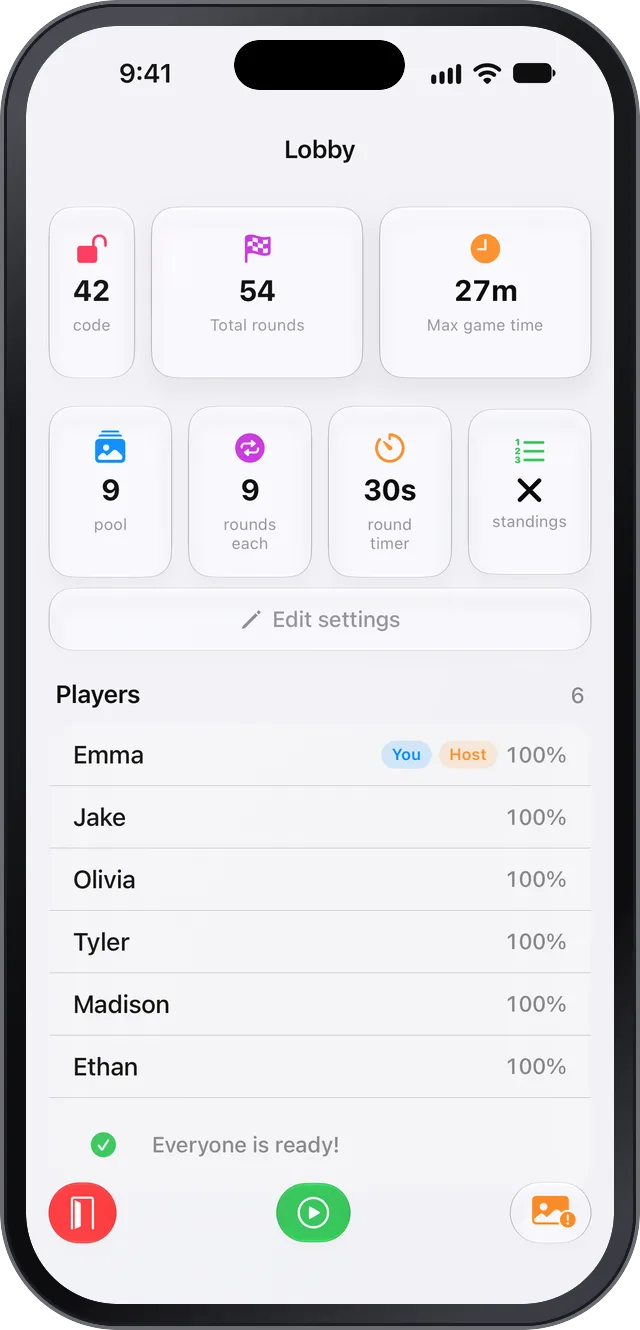
It has limits. It runs on iPhone and iPad only, so one Android phone in the group means it's the wrong game for that trip. It needs at least 3 players, and everyone has to be close together. Run the two-minute test on it, like you would for anything else.
If you play it somewhere new, our guide to keeping private photos out of camera roll games covers what to tidy up first.
The short version
"Offline" might mean alone. "Local" might mean a router. "No Wi-Fi needed" might still mean Wi-Fi switched on. Store pages won't settle it, and two minutes in airplane mode will.